









Function canceled
Function canceled

 Lyngsat
Kingofsat
Dishpointer
DVBSkystar.com
satbeams.com
CS Sat fórrum
Parabola
DVB-Upload
DVB N Forum
dvhk.pl
sat-television
Sat Centrum
SkyStar.org
TV Freak
Technisat
techneteuweb
Jak psat web
Jak na web
Zive.cz
Interval
O webu
Webguru
Builder.cz
Linuxsoft.cz
Tutorials.cz
web.net-mag.cz
Kosek.cz
webtvorba.cz
CSS Creator
samples.cz
programujte.com
builder.cz
časopis.programátor
učebnica c++
Odkiaľ je IP
Uč sa Anglicky
Speedtest
Otestujte sa
Lyngsat
Kingofsat
Dishpointer
DVBSkystar.com
satbeams.com
CS Sat fórrum
Parabola
DVB-Upload
DVB N Forum
dvhk.pl
sat-television
Sat Centrum
SkyStar.org
TV Freak
Technisat
techneteuweb
Jak psat web
Jak na web
Zive.cz
Interval
O webu
Webguru
Builder.cz
Linuxsoft.cz
Tutorials.cz
web.net-mag.cz
Kosek.cz
webtvorba.cz
CSS Creator
samples.cz
programujte.com
builder.cz
časopis.programátor
učebnica c++
Odkiaľ je IP
Uč sa Anglicky
Speedtest
Otestujte sa

S2emu Emulator

S2emu is a plugin that replaces the CAM module and access pay card — in other words, it is a program that replaces the “hardware”. This means that with the SkyStar2 card you no longer need to buy anything extra to make some encrypted channels work. This plugin must be copied into the plugins directory (or into the root directory, e.g. ProgDVB, as stated in the readme). For actual decoding, the s2emu.dll library alone is not enough — additional files are required (I won’t describe them here). They are usually included with the packed S2emu on various SAT upload sites. After launching the player, an encrypted channel should already open, of course only those for which keys exist, including emu keys. Specifically, S2emu can handle these systems: Seca1/2, Irdeto, Viaccess1/2 (there are several — 2.3, 2.4, 2.5), Nagra1/2, Cryptoworks, Conax, Biss. Maybe I forgot some system, but I hope you forgive me.

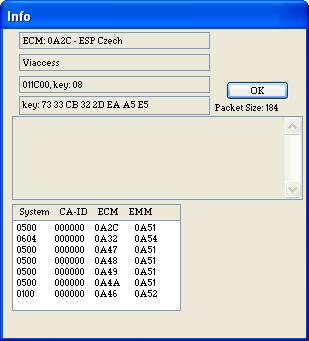
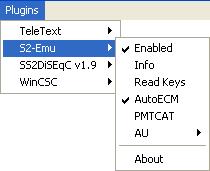
When we open the plugin menu in the DVB player, S2emu should appear there (second image). There are several options: enable, info, load keys, auto‑select ECM PID, PMTCAT, autoupdate, and about/version. When we click “Info”, the first window appears — it is a log for the user. There we can see ECM, channel, provider ID, and the actual key. If something does not work, this is where we find out what the issue is. And finally, a warning: This software is intended only for study purposes. It is forbidden to use it for illegal viewing of paid television.